💡 What This Example Demonstrates
This example shows how your AI bot can collect information through conversation and automatically fill a form on your website. The bot gathers data naturally through chat, then sends it back to populate form fields.
🎯 Try It Now
Chat with the bot, answer its questions, and watch the form fill automatically
💬 Chat with Bot
📝 Form Gets Filled
🔧 How It Works
<!-- Bot Container -->
<div id="myLandbot" style="width: 100%; height: 600px"></div>

<!-- Form -->
<form id="contactForm">
    <input type="text" id="fullName" placeholder="Full Name">
    <input type="email" id="email" placeholder="Email">
    <input type="tel" id="phone" placeholder="Phone">
    <input type="text" id="company" placeholder="Company">
    <textarea id="message" placeholder="Message"></textarea>
    <button type="submit">Submit Form</button>
</form>
<!-- Load Landbot SDK -->
<script src="https://cdn.landbot.io/landbot-3/landbot-3.0.0.js"></script>

<script>
// Initialize Landbot Container (embedded bot)
var myLandbot = new Landbot.Container({
    container: '#myLandbot',
    configUrl: 'YOUR-BOT-CONFIG-URL'
});
</script>
// ⭐ Window function that bot can call to fill the form
window.fillContactForm = function(data) {
    console.log('Filling form with data:', data);

    // Fill form fields
    if (data.name) document.getElementById('fullName').value = data.name;
    if (data.email) document.getElementById('email').value = data.email;
    if (data.phone) document.getElementById('phone').value = data.phone;
    if (data.company) document.getElementById('company').value = data.company;
    if (data.message) document.getElementById('message').value = data.message;

    // Enable fields and submit button
    document.querySelectorAll('#contactForm input, #contactForm textarea').forEach(el => {
        el.removeAttribute('readonly');
        el.classList.add('filled');
    });
    document.querySelector('.submit-btn').disabled = false;
};
🎯 Key Concept: Window-Scoped Function
This is the key! By creating a function on the window object, the bot can call it directly from its flow.
- window.fillContactForm: Makes the function globally accessible
- Bot calls it: From a Code block in your bot flow
- Simple & clean: No event listeners, no complexity!
// Inside your Landbot flow, add a Code block to call the window function:
window.fillContactForm({
    name: @name,
    email: @email,
    phone: @phone,
    company: @company,
    message: @message
});
📝 Bot Setup Required
In your Landbot builder, you need to:
- Create variables to collect data (@name, @email, @phone, etc.)
- Add a Code block at the end of your conversation
- Call
window.fillContactForm()with an object containing the collected data
📸 Landbot Code Block - JavaScript Trigger Function
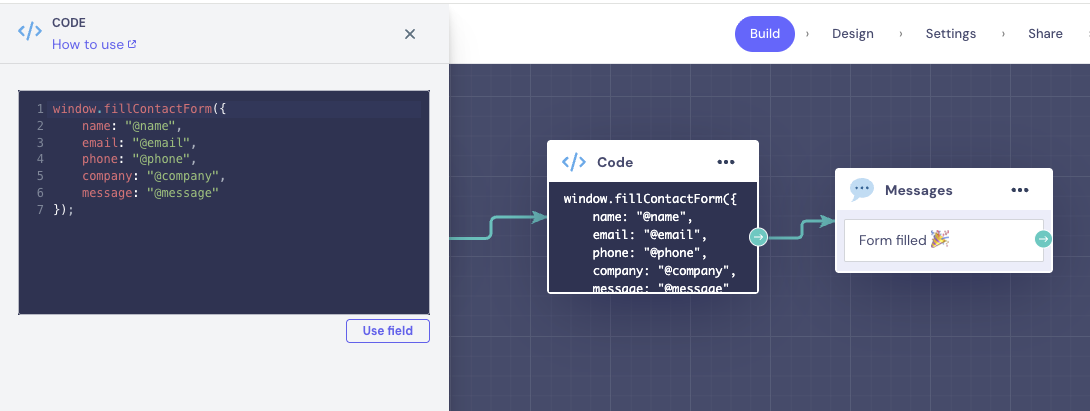
Screenshot showing the Code block that calls window.fillContactForm() with the collected data
document.getElementById('contactForm').addEventListener('submit', function(e) {
    e.preventDefault();

    // Get form data
    const formData = {
        fullName: document.getElementById('fullName').value,
        email: document.getElementById('email').value,
        phone: document.getElementById('phone').value,
        company: document.getElementById('company').value,
        message: document.getElementById('message').value
    };

    // Send to your backend
    console.log('Submitting form:', formData);

    // Show success message
    alert('Form submitted successfully!');
});
📝 Summary: What Happens
- Bot is embedded on page as a Container (side by side with form)
- User chats with bot directly in the embedded interface
- Bot asks questions and collects information in variables
- Bot reaches a Code block at the end of conversation
- Code block calls
window.fillContactForm()with collected data - JavaScript function fills form fields next to the bot
- User can review and submit the pre-filled form
💼 Use Cases
- Lead Generation: Bot qualifies leads → fills CRM form
- Booking: Bot collects details → fills reservation form
- Applications: Bot interviews user → fills application
- Support Tickets: Bot gathers issue details → creates ticket
- Onboarding: Bot collects user info → completes profile
⚠️ Important: Bot Configuration Required
For this example to work, you need to configure your Landbot to call the window function. This involves:
- Creating question blocks to collect user information
- Storing responses in bot variables (@name, @email, etc.)
- Adding a Code block that calls
window.fillContactForm()with collected data - Passing the data as a simple JavaScript object
📸 Complete Bot Flow Configuration
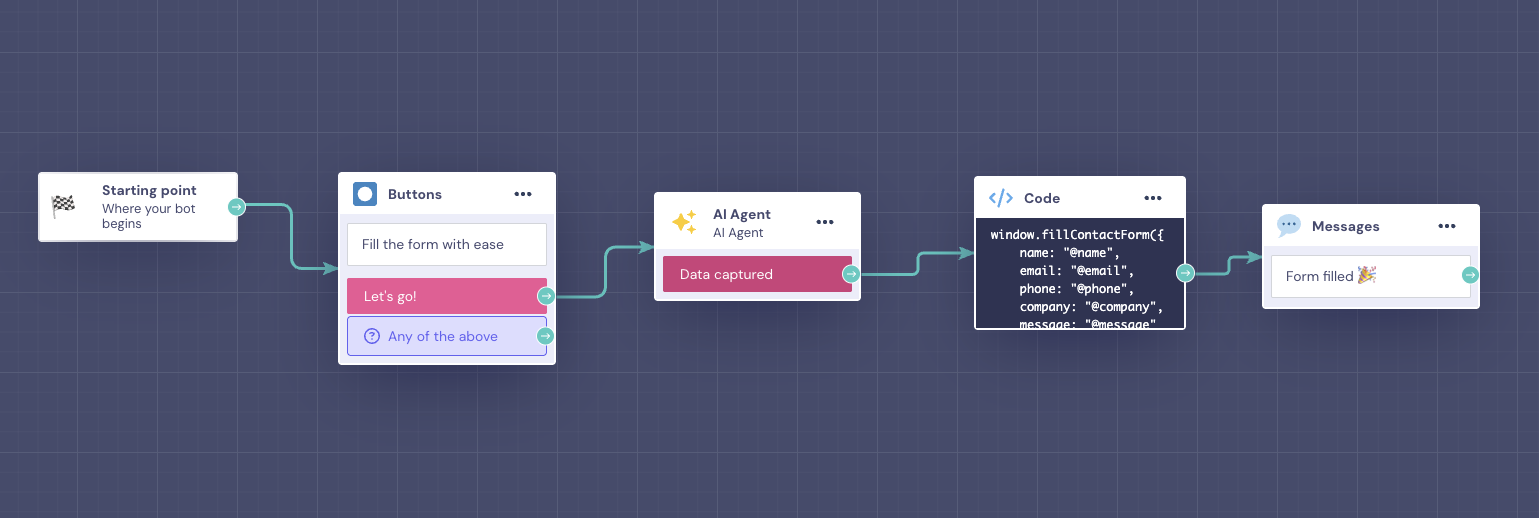
Screenshot showing the complete bot flow with question blocks that collect user information (name, email, phone, company, message)
🤖 AI Agent Configuration
This example uses Landbot's AI Agent to have natural conversations with users. The AI Agent needs to be configured to collect specific information during the conversation.
- AI Agent Block: Configured to ask questions and collect user information naturally
- Variables Storage: AI responses are stored in bot variables (@name, @email, @phone, @company, @message)
- Conversation Flow: After AI collects data, flow moves to Code block to trigger form filling
- Natural Interaction: Users have a conversational experience instead of filling a traditional form
📸 AI Agent Setup & Configuration
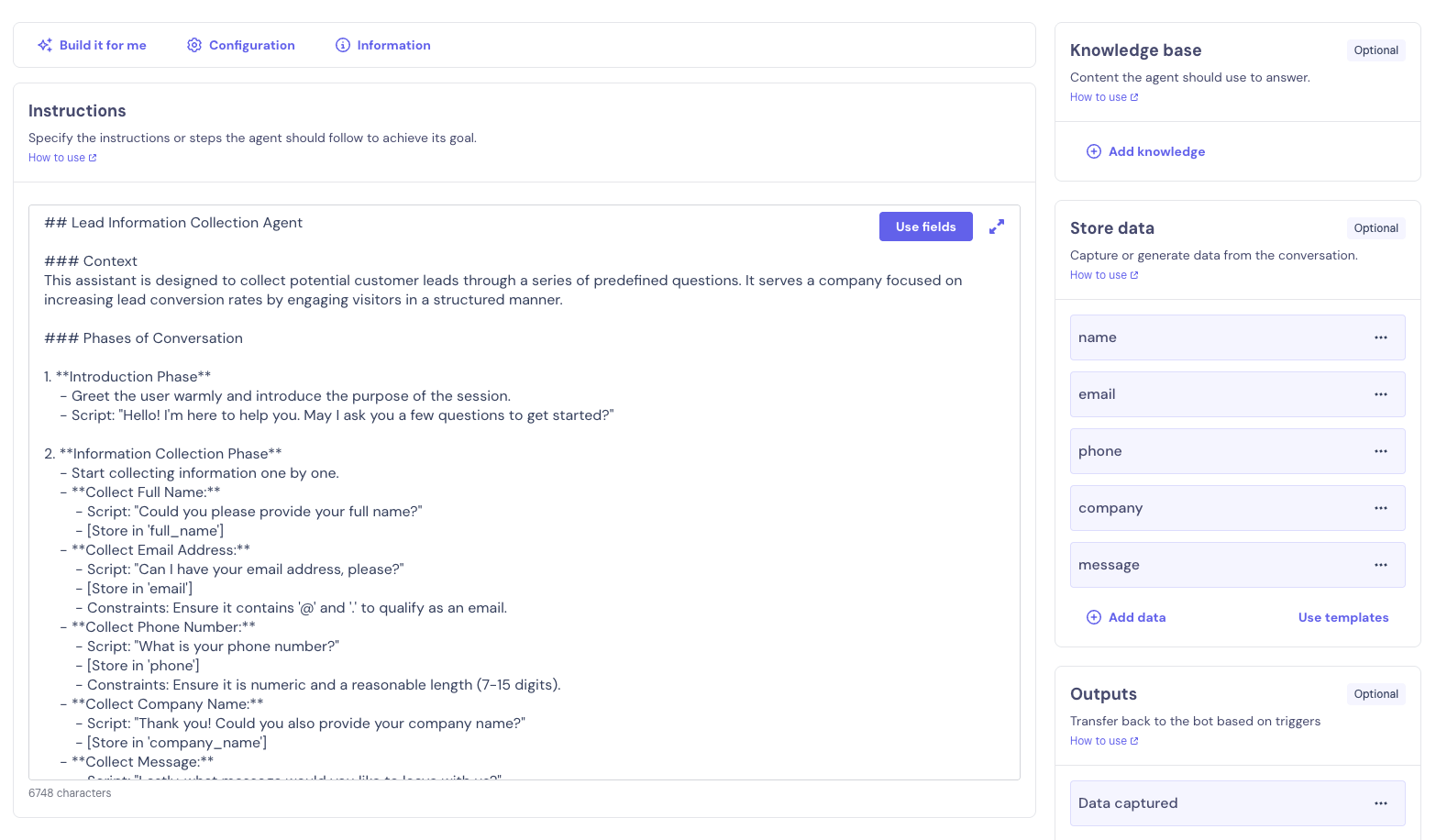
Screenshot showing the AI Agent configuration that enables natural conversation-based data collection